Time 0:00–0:35
Meet Reflex and set up your environment
By the end of this lesson, the default Reflex app will be running in your browser, and you'll be able to explain in one sentence how Reflex turns Python code into a web app.
1-1. What is Reflex? (10 min)
A web app usually has two parts:
- Frontend: the UI that runs in the browser, usually built with HTML, CSS and JavaScript (React and friends).
- Backend: the logic and data that run on the server, built with Python (Django, FastAPI) or similar.
Normally you have to learn both languages and design an API between them. Reflex is a full-stack framework that lets you write both the frontend and the backend in Python.
It works in three steps:
- Compile: the Python functions that build your UI (components) run once when the app starts and are turned into React code. The output goes into the
.web/folder. - State lives on the server: your data (State) and event handlers run as Python on the server.
- Sync over WebSocket: when you click a button, the browser sends an event to the server, the server sends back only the state that changed, and the page re-renders automatically.
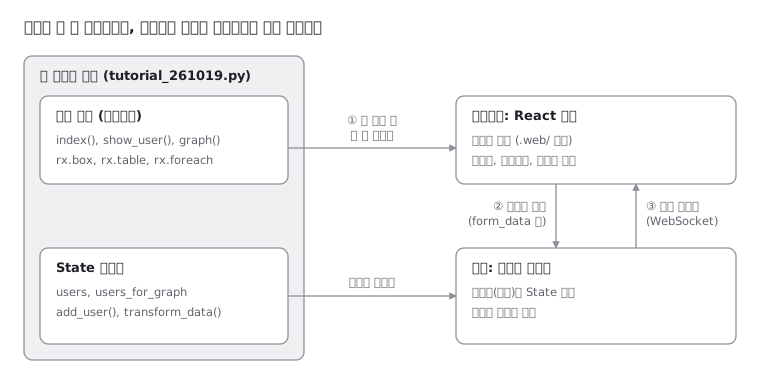
The single Python file on the left splits two ways. The UI functions are compiled to React and shipped to the browser, while State stays on the server and syncs with the page through the ② → ③ round trip.
Instructor note — These three steps come up again and again throughout the course. Sum them up in one line, "UI functions run once, event handlers run every time," and bring it back in Lesson 3 when you explain why you can't use if.
1-2. Set up your environment (10 min)
Install uv: uv is a tool that manages Python versions, virtual environments and packages in one place.
# Windows (PowerShell)
powershell -ExecutionPolicy ByPass -c "irm https://astral.sh/uv/install.ps1 | iex"
# macOS / Linux
curl -LsSf https://astral.sh/uv/install.sh | shCheck Node.js: Reflex uses Node.js or Bun to install and run the frontend (React) packages. Reflex 0.10 requires Node 22.22.0 or later.
node -v # should be v22.22.0 or later1-3. Create and run a project (10 min)
uv init tutorial_261019        # create a Python project
cd tutorial_261019
uv add reflex                  # install reflex (recorded in pyproject.toml)
uv run reflex init             # scaffold a Reflex app (pick a template)
uv run reflex run              # start the dev server
uv runruns a command inside the project's virtual environment (.venv). You don't need to activate the environment yourself.reflex initasks you to pick a template. To start from an empty app, you can pass it directly:uv run reflex init --template blank.- Once
reflex runis up, open theApp running at: http://localhost:3000address from the log in your browser. If port 3000 is taken, it moves to 3001 or another port. - By default, the frontend runs on port 3000 and the backend on port 8000.
- The first run can take 1–3 minutes while it downloads the frontend packages. You need an internet connection.
- To stop the server, press
Ctrl + Cin the terminal.
Check your browser — Right after creating the app with --template blank, opening http://localhost:3000 should show this screen. The sun icon in the top-right corner toggles dark mode.
localhost:3000
Live preview1-4. Two common errors on Windows (5 min)
We actually ran into these while preparing the course. Your students are likely to hit them too, so warn them up front.
| Symptom | Cause | Fix |
|---|---|---|
UnicodeEncodeError: 'cp949' codec can't encode character '—' during reflex init | Windows uses a non-UTF-8 system code page (e.g. cp949 on Korean Windows, cp932 on Japanese, cp936/GBK on Chinese), so writing AGENTS.md fails on a special character | Run setx PYTHONUTF8 1, restart the terminal, then run reflex init again |
restartWithMergedOptions() was called, but the process has already been restarted during reflex run | Node is older than the required version, so Reflex forces the Bun runtime, and the React Router restart fails on that path | Upgrade Node to 22.22.0 or later (e.g. winget upgrade --id OpenJS.NodeJS.22) |
- Environment variables set with
setxonly apply to terminals you open afterwards. If you use the VS Code terminal, restart VS Code too. - If winget says it can't find an installed package, run
winget list --name Nodeto check the actual package ID.
Checkpoint
-
node -vshows 22.22.0 or later. - After
uv run reflex run, you can see the default page in your browser. - You can explain in your own words: "UI functions are compiled once; event handlers run on the server every time."
Get news about new lessons
We'll email you when this course gets new lessons or a follow-up course opens.
R
ReflexKR
Learn Python and Reflex by doing. Every example was run and verified on Reflex 0.10.0.
ReflexKR is free, with no banner ads. If it helped you, you can support it with a coffee. ☕ Buy us a coffee
Affiliate disclosure© 2026 ReflexKR · Since 2026 · CC BY-NC 4.0
Questions & answers
Ask anything about this lesson. Questions from every language version of this page appear together.